
If you’re running a WordPress site, getting found on Google can feel a bit like guessing in the dark. WordPress is pretty SEO‑friendly out of the box, but a handful of tweaks can dramatically change how much organic traffic actually shows up. The tips below walk through how WordPress SEO works, what to avoid, and practical steps that help more of the right people discover your content.
Understanding WordPress SEO
What is SEO and why it matters for WordPress
Search Engine Optimization (SEO) is the practice of improving a website so search engines can understand it, trust it, and show it to people who are searching for what it offers. For WordPress sites, SEO matters because most visitors start with a search query. Showing up when those queries match your content is the difference between a quiet site and a growing one.
WordPress already has a lot going for it: clean code, a logical content structure, and a huge ecosystem of themes and plugins. With a little attention, those strengths turn into real visibility in search results.
Solid WordPress SEO usually comes down to three areas:
- Technical SEO – how easily search engines can crawl and index the site (speed, mobile-friendliness, sitemaps, permalinks).
- On-page SEO – how pages and posts are written and structured (keywords, titles, headings, internal links).
- Off-page SEO – what happens away from the site (backlinks, brand mentions, social visibility).
When those pieces support each other, search engines see a site that loads quickly, answers real questions, and is trusted by others, which is exactly the kind of site that tends to rank.
Common mistakes in WordPress SEO
A lot of SEO problems on WordPress sites come from “set it and forget it” publishing. Some of the most common issues:
- Default permalinks like ?p=123 instead of readable URLs.
- No SEO plugin, so titles, meta descriptions, and sitemaps are never really optimized.
- Keyword stuffing, where the same phrase appears everywhere and content starts to sound robotic.
- Thin content, such as short posts that don’t really answer anything or duplicate pages saying the same thing.
- Slow performance caused by heavy themes, bloated plugins, and uncompressed images.
- Poor mobile experience that looks fine on desktop but clumsy on a phone.
- Messy categories and tags, creating dozens of near-empty archive pages.
- Weak internal linking, so search engines struggle to understand which content matters most.
- Outdated software, which can lead to security issues or downtime that tanks visibility.
Avoiding these mistakes alone puts a site ahead of a lot of competition. The rest of this guide focuses on specific actions that take things further.
11 tips for improving WordPress SEO
1. Optimize your content with keywords
Good SEO starts before hitting “Publish.” A bit of keyword research up front makes content easier to find later.
To effectively choose and use keywords, focus on search intent (what someone is truly trying to solve) along with prioritizing long-tail keywords. These more specific phrases, like “WordPress SEO tips for small businesses,” are often less competitive and more targeted. Also, include related terms and supporting phrases to give search engines more context about your site’s content.
Once you have your keywords, work them in naturally. Use the primary keyword in the title, URL slug, first paragraph, and at least one subheading. Throughout the rest of the content, include related phrases only where they actually fit. Ultimately, your goal should be to fully answer the question behind the search, not just to hit a specific keyword count.
If the content reads well to a human and clearly solves a problem, it’s already on the right track. Keywords just help make that relevance more obvious to search engines.
2. Use the right SEO plugins
SEO plugins turn a lot of technical tasks into simple settings. Popular options include Yoast SEO, Rank Math, and All in One SEO.
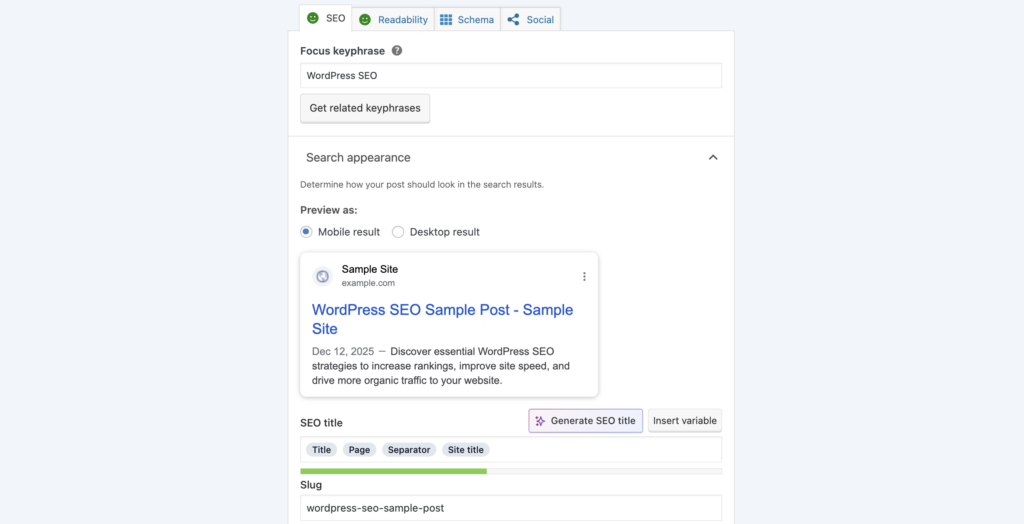
A good SEO plugin should make it easy to:
- Edit title tags and meta descriptions for posts, pages, and taxonomies.
- Generate XML sitemaps.
- Set canonical URLs to avoid duplicate content issues.
- Control which content is indexed or noindexed.
Pick one plugin, walk through its setup wizard, and stick with it. Using several SEO plugins simultaneously can cause conflicts and result in confusing outputs.
Think of the plugin as the control panel. The site owner still calls the shots on strategy, but the plugin makes putting that strategy into action consistently a whole lot easier.
3. Improve site speed and performance
Slow sites frustrate visitors and send negative signals to search engines. Performance is one of the highest‑leverage SEO improvements available.
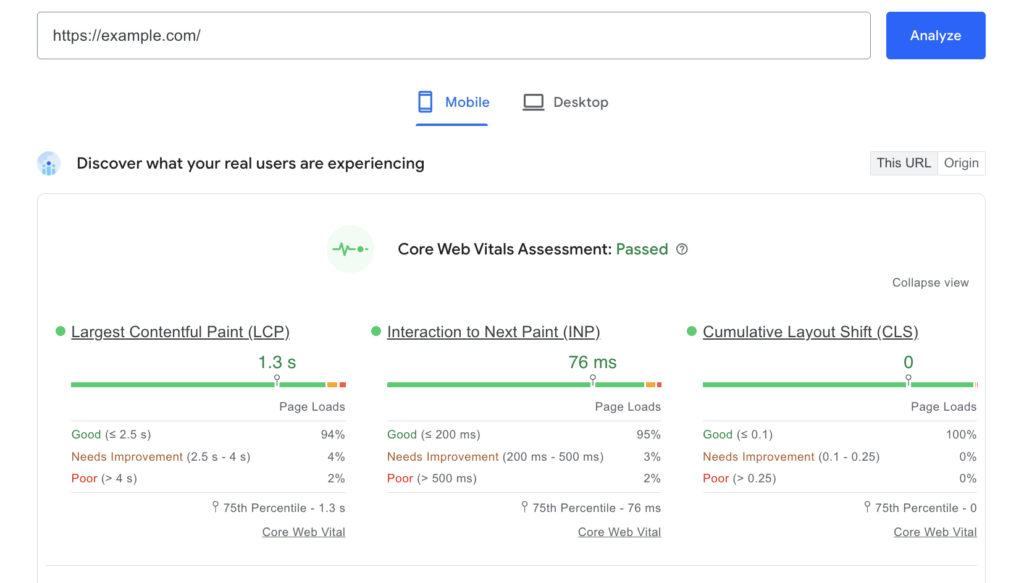
Start by testing a key page with tools like PageSpeed Insights or GTmetrix. If you want your site to load fast, caching is your friend. You can accomplish this with a solid plugin or by maxing out what your host already offers. Next up: your media. This is a common speed killer, so always compress those images and don’t upload a massive file when a tiny version will do the job.
You also need to do some regular maintenance. Get rid of any plugins you aren’t using, and steer clear of any heavy themes that bog everything down with extra code. Speaking of the code side of things, it’s worth the small effort to minify your CSS and JavaScript. It shrinks the files and gets them loading quicker.
Finally, for the absolute best performance for your static stuff (like images and scripts), setting up a Content Delivery Network (CDN) is a huge win. A CDN dramatically reduces page load times by serving your files to visitors from a server located very close to them.
4. Make your site mobile-friendly
More searches happen on mobile than desktop, and Google uses the mobile version of a site for indexing. A layout that only looks good on a laptop isn’t enough.
- Use a responsive theme from the WordPress theme directory or a reputable provider.
- Test on actual devices, not just a resized browser window.
- Keep fonts and spacing large enough to read without zooming.
- Make sure buttons and links are easy to tap with a thumb.
- Avoid intrusive popups that cover the screen on mobile.
- Keep navigation simple, with clear labels and not too many nested menus.
Making your site work great on mobile usually boosts how well it performs overall. You’ll likely see people stick around longer, share your content more, and get better SEO results.
5. Utilize meta descriptions and tags
Title tags and meta descriptions essentially serve as little ads that appear for your site in search results. They’re key for search engines, sure, but they’re also what helps people decide if your link is worth a click.

Some simple guidelines:
Title tags

- Include the primary keyword naturally.
- Stay clear and specific (around 50–60 characters is a useful target).
- Avoid stuffing in every keyword variation.
Meta descriptions
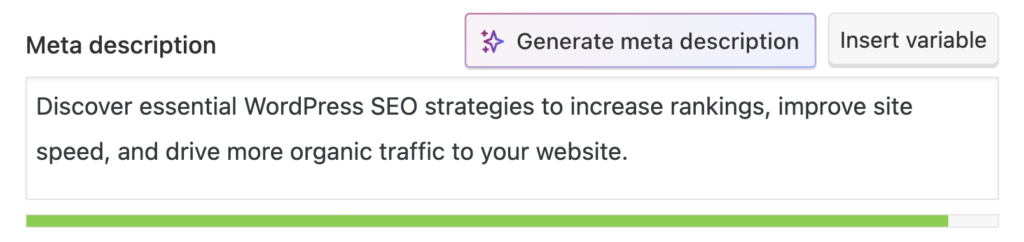
- Use 1–2 short sentences that explain the value of the page.
- Include the main keyword if it fits naturally.
- Give people a reason to click, such as a benefit or outcome.
Most SEO plugins add a meta box in the WordPress editor for this. Tweaking these fields for your most important pages can instantly boost click-through rates, even without a change in ranking.
6. Optimize your images
Images can help a page rank or slow it down, depending on how they’re handled.
For better SEO and performance:
- Use descriptive file names, like wordpress-seo-dashboard.jpg instead of IMG_3456.jpg.
- Fill in the alt text field with a short, accurate description that helps both screen readers and search engines.
- Compress images before upload, or use an image optimization plugin to handle compression automatically.
- Choose the right dimensions so huge files aren’t scaled down in the browser.
- Consider modern formats like WebP where supported.
- Make sure lazy loading is turned on so off‑screen images don’t slow initial page load.
These little things really make a difference through faster pages, better accessibility, and sometimes a nice bump in traffic from image searches.
7. Structure your URL and permalinks
Want your site to look good and show up in search results? Use URLs that are clean and easy to read. Head over to Settings > Permalinks and pick the Post name setting (/%postname%/). It’s a great choice, especially for blogs and sites focused on content.
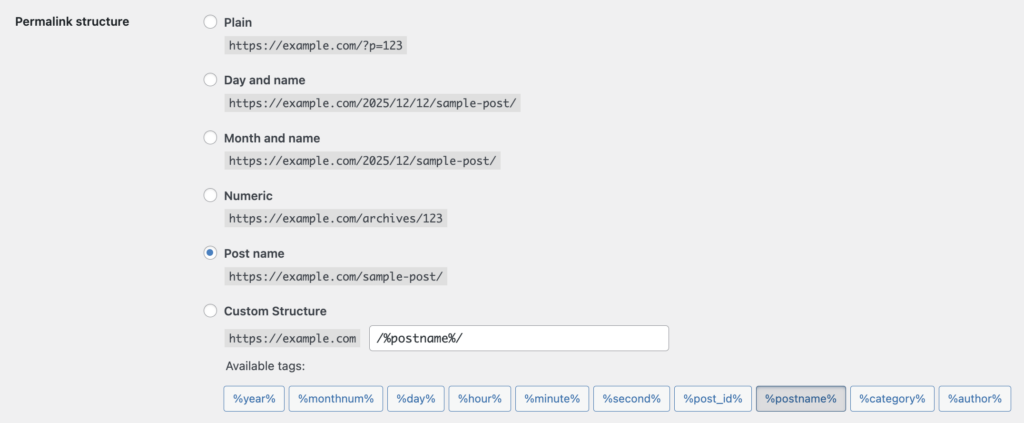
For individual URLs:
- Slugs should be short and descriptive.
- Include the primary keyword where it makes sense.
- Avoid unnecessary filler words.
- Don’t change URLs after publishing unless there’s a good reason. If a change is needed, set up a 301 redirect from the old URL to the new one.
Simple permalinks are one of those decisions that silently pay off for years.
8. Build quality backlinks
Getting good backlinks is still a big deal for showing you’re an authority. A handful of good links usually beats a pile of spammy ones.
Useful ways to earn them:
- Publish in‑depth, evergreen content that others naturally want to cite.
- Contribute guest posts to relevant, reputable sites in the same space.
- Share updated or improved content with sites already linking to older resources.
- Look for broken links on related sites and suggest a relevant page as a replacement.
- Build relationships in the niche so content gets noticed and shared.
Steer clear of buying links or joining those obvious link schemes. Search engines are pretty smart at catching those patterns, and that quick win usually isn’t worth the long-term headache.
9. Ensure good user experience
If you want search engines to love your pages, you’ve got to give visitors a great, easy-to-use experience. That’s the direct connection between UX and SEO success. The first step is making sure people instantly know where to go with clear navigation. That also means having layouts that are easy on the eyes (think smart headings, short paragraphs, bullet points, and plenty of empty space) so the content is simple to read.
You also need to ditch the distractions. Seriously, no auto-playing videos or annoying pop-ups that block the main content. Beyond the single page, consistent internal links are key to smoothly guiding readers to other relevant stuff. All of this should live on a site with a structure that just makes sense, where you’ve logically grouped your topics.
Finally, your analytics tools are your best friends for spotting exactly where people are getting frustrated or leaving. Fix those pain points, and you’ll see better engagement and, over time, a boost in your SEO results.
10. Use social media for SEO
Social media doesn’t directly control rankings, but it does influence how content spreads and gets discovered.
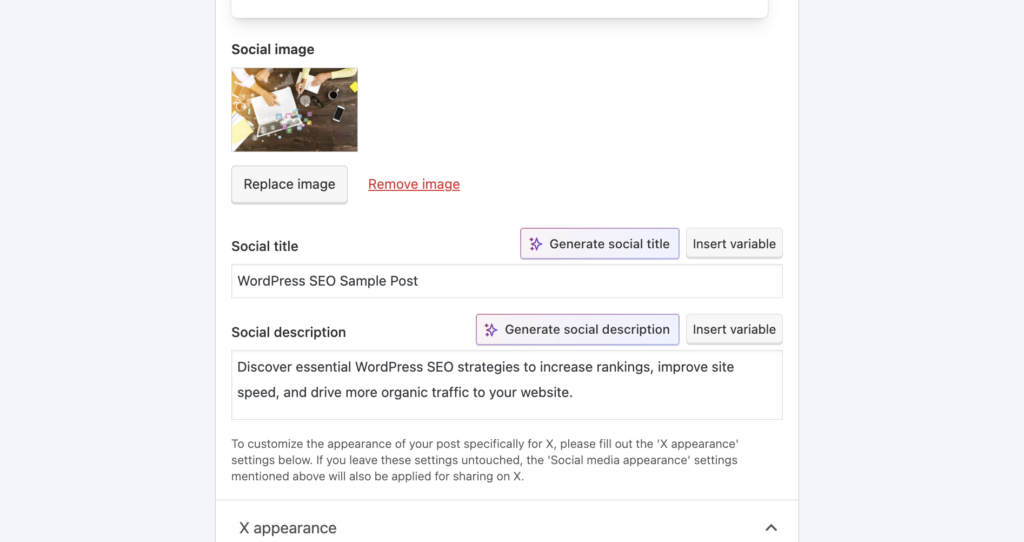
Some simple tactics:
- Add lightweight share buttons to posts so readers can boost reach with one click.
- Make sure Open Graph and Twitter Card tags are configured (most SEO plugins handle this), so shared links look good.
- Repurpose strong content into short posts, threads, or videos that link back to the site.
- Use consistent branding and point profile bios back to the main domain.
The more a piece of content travels, the more chances it has to attract links, mentions, and brand searches, all of which support SEO.
11. Keep your site updated
An outdated WordPress site isn’t just a security risk; it also tends to be slower and less stable.
There are two parts to staying current:
Technical updates
- Keep WordPress core, themes, and plugins updated.
- Remove anything that’s no longer needed.
- Monitor uptime and security.
- Use backups and, ideally, a staging site for big changes.
Content updates
- Refresh strong posts with new data, examples, and screenshots.
- Merge or prune thin, overlapping content.
- Check internal links so they still point to the best resources.
Search engines favor sites that look active and maintained. Regular updates send the message that content is trustworthy and up to date.
Measuring your WordPress SEO success
Tools for tracking SEO performance
A basic analytics stack goes a long way:
- Google Analytics 4 for traffic, engagement, and conversions.
- Google Search Console for search queries, rankings, and indexing status.
Optional extras like Ahrefs, Semrush, or other SEO platforms can track keyword positions and backlinks more deeply, but the free Google tools already cover a lot.
Set tracking up early, even if the numbers seem small at first. Historical data makes it much easier to see which optimizations actually moved the needle.
Interpreting SEO analytics data
A few key metrics say more than a dozen dashboards.
In Google Analytics, pay close attention to:
- Organic traffic trends over time.
- Top landing pages from search and how well they keep people engaged.
- Differences in behavior between desktop and mobile visitors.
In Search Console, watch:
- Queries that drive impressions and clicks.
- Average position and click‑through rate for important pages.
- Indexing issues or coverage errors that might be blocking content from search results.
- Any Page Experience or performance warnings.
Whenever an SEO change is made (new internal links, a big content update, improved speed), compare performance before and after over a few weeks. Patterns usually start to emerge.
Bringing your WordPress SEO strategy together
Strong WordPress SEO is about getting the basics right and keeping them consistent: clear content, smart keyword use, clean URLs, fast pages, good mobile experience, and a structure that makes sense to both people and search engines.
Add in a steady flow of useful content, a handful of quality backlinks, and regular updates, and most WordPress sites can build a reliable stream of organic traffic over time.
A big part of this work depends on solid infrastructure. Managed WordPress hosting from a provider like Pagely can handle a lot of the heavy lifting around performance, security, and updates, freeing more time to focus on strategy, content, and the kind of improvements that actually move rankings.
WordPress already offers a strong foundation. With the right habits in place, that foundation can easily become one of the most valuable marketing assets in the stack.