
It can take a few hours to launch a WordPress landing page and several years for it to completely disappear.
It’s easy to miss that imbalance. Whenever there are product launches, promotions, events, or paid campaigns, there is pressure to get things published quickly, and the quickest way to do this is usually to copy an existing page, change the headline, replace the form, and then proceed.
The page could well function as intended, with the issue arising afterward, when the offer expires, the product changes, the form is directed to the wrong campaign, or the same claim has to be updated on several nearly identical pages.
This is what we call content debt. It’s the maintenance burden that arises when decisions about publishing place a priority on the immediate launch without considering the ownership of the content, the dependencies involved, or the eventual end of the content’s lifecycle.
It is easy to create WordPress landing pages, and with the right structure in place, they can be even easier to update, measure, and retire.
What content debt looks like in WordPress
Content debt usually doesn’t result from a single clearly defective page. Instead, it builds up due to small inconsistencies as the website grows.
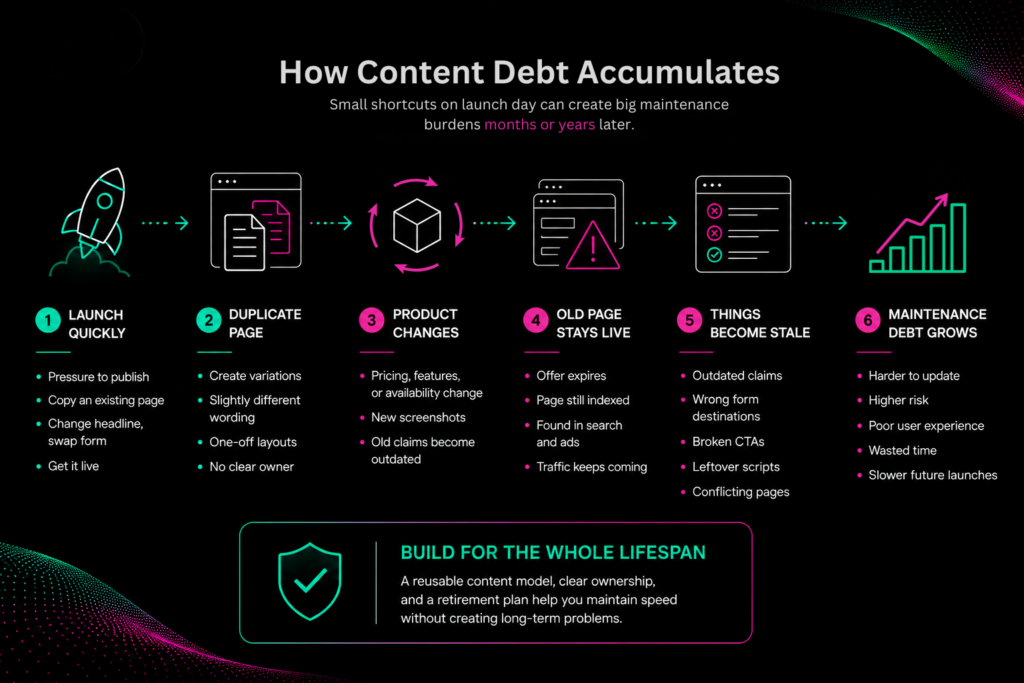
Common examples include:
- Landing pages that repeat the same product claims with slightly different wording
- Old feature names, screenshots, prices, or availability details
- Expired offers that still appear in search results
- Forms connected to outdated lists, workflows, or CRM campaigns
- Calls to action pointing to pages that have moved
- Campaign scripts that continue loading after they are no longer needed
- Pages with no clear owner or review date
- One-off layouts that require developer support for routine copy changes
- Nearly identical pages competing for the same search intent
The fact that these problems occur doesn’t necessarily prove that the campaign has failed. It usually shows that the page was constructed with launch day in mind rather than considering its entire lifespan.
It is not necessary for every landing page to be evergreen since the aim is to ensure that temporary content is both intentional and manageable.
Start with a structured campaign brief
Instead, a landing page should start with a clear brief rather than with an empty WordPress page.
At minimum, document:
- The intended audience
- The campaign objective
- The primary offer
- The approved value proposition
- Supporting product claims
- Available proof points
- The primary call to action
- The campaign owner
- The source of truth for product information
- The launch and review dates
- The conversion event or form destination
- The expected action after the campaign ends
Such details can be included in a project template, an internal document, or in a set of WordPress custom fields. What is important is being able to distinguish between campaign-specific messaging and the information that should be kept consistent throughout the site.
It is this distinction that decides whether something should be made into a reusable pattern, a shared data field, a fixed component, or local page copy.
Use WordPress patterns selectively
WordPress patterns provide content teams with a dependable initial structure without requiring every campaign page to have the same appearance or tone.
Unsynced patterns work well for sections that follow a common format but require page-specific content, such as:
- Hero sections
- Feature summaries
- Customer proof
- Frequently asked questions
- Comparison sections
- Conversion panels
The editors are able to put in the pattern and modify it for the campaign without having to alter the other pages.
For content which should stay the same no matter where it appears, synced patterns are the better choice. Examples of this might include an approved disclosure, a standard contact block, or a centrally managed call to action.
The difference is important. If you convert too much content into synchronized patterns, you may end up with unexpected changes across the whole site, while if you convert too little content into shared components, then teams will have to update the same information manually.
Block locking and editing limited to content do offer a useful compromise. While writers look after the approved text and images, designers and developers are able to protect the structure which ensures that the page remains functional and consistent.
Separate campaign messaging from page mechanics
A writer ought not to have to edit the CSS, the tracking code, the form settings, or the responsive layout controls in order to update a headline.
A developer should likewise not be required to deploy code every time the marketing team alters a benefit statement.
A durable WordPress campaign workflow separates these responsibilities:
- Writers and marketers handle their positioning, copy, metadata, and the calls to action.
- The designers set out the visual system and approved the layout options.
- Developers look after components, forms, integrations, and the technical behaviour.
- Factual claims are approved by product owners or subject matter experts.
- Campaign owners are in charge of making the decisions regarding distribution, measurement, and the lifecycle.
It is possible to achieve this level of separation using patterns, custom blocks, custom fields, and block bindings, depending on the complexity of the site.
The principle is simple in that content which needs to be changed frequently should be possible to edit without affecting the technical aspect of the system, and there should be no need for anyone to remember on each page where a particular fact is repeated.
Wherever possible, product information that is important should stay as page content. It is more difficult to locate and update pricing, dates, feature names, requirements, and calls to action when these details are included in images.
Track claims that can expire
Certain copies involve a low level of risk. It’s generally possible to alter the headline without causing any technical or compliance issues.
Other statements require more control, including:
- Pricing and packaging
- Product availability
- Supported software versions
- Performance results
- Security capabilities
- Compliance statements
- Service commitments
- Customer counts or usage statistics
- Competitive comparisons
To make these claims, keep a simple record including the approved wording, the authoritative source, the owner, the verification date, the affected pages, and the next review date.
It doesn’t have to develop into a second content management system; a spreadsheet or an internal documentation page would be sufficient.
The aim is to ensure that significant claims can be traced. If there is a change to the product name, price, certification, or the supported version, the content team must be able to determine all the pages that are affected without having to rely on their memory or carry out a general site search.
Sharing components will reduce the number of instances that need to be edited by hand, but it does not take away the need for ownership. There will still have to be someone who checks that the new information is accurate and decides where it should be applied.
Treat tracking as part of the page
Campaign measurement is usually carried out after the page has been written, but it should be established a lot sooner.
Every WordPress landing page should have:
- One primary conversion goal
- A consistent event name
- An approved UTM structure
- The correct form or CRM campaign destination
- A defined thank-you experience
- An owner responsible for validating the data
- A plan for what happens to the tracking after the campaign
Copying an existing landing page will also copy any hidden fields, campaign identifiers, analytics events, and scripts. Although the visible content might be accurate, submissions will still be directed to an older workflow.
A prepublication review should therefore cover both the content and the conversion path:
- Confirm every button destination.
- Fill in each form with test information.
- Check the hidden fields and the lead-routing rules.
- You can check the analytics events in a testing or debugging view.
- Look at the title, the description, the canonical setting, and the social preview.
- Check the page on desktop and on mobile.
- Make sure that the keyboard navigation, the labels, the contrast, and the alternative text are all working properly.
- Get rid of any scripts or integrations that the campaign doesn’t need.
- After deployment, make sure that the relevant caches are cleared or refreshed.
- The intended time zone should be used when confirming the scheduled publication.
A landing page is not considered complete simply because the copy has been approved. It is only complete when the entire process from visit to conversion has been tested.
Plan the page’s end before launch
The campaign’s end date should lead to a decision regarding the content, not just mark the end of paid promotion.
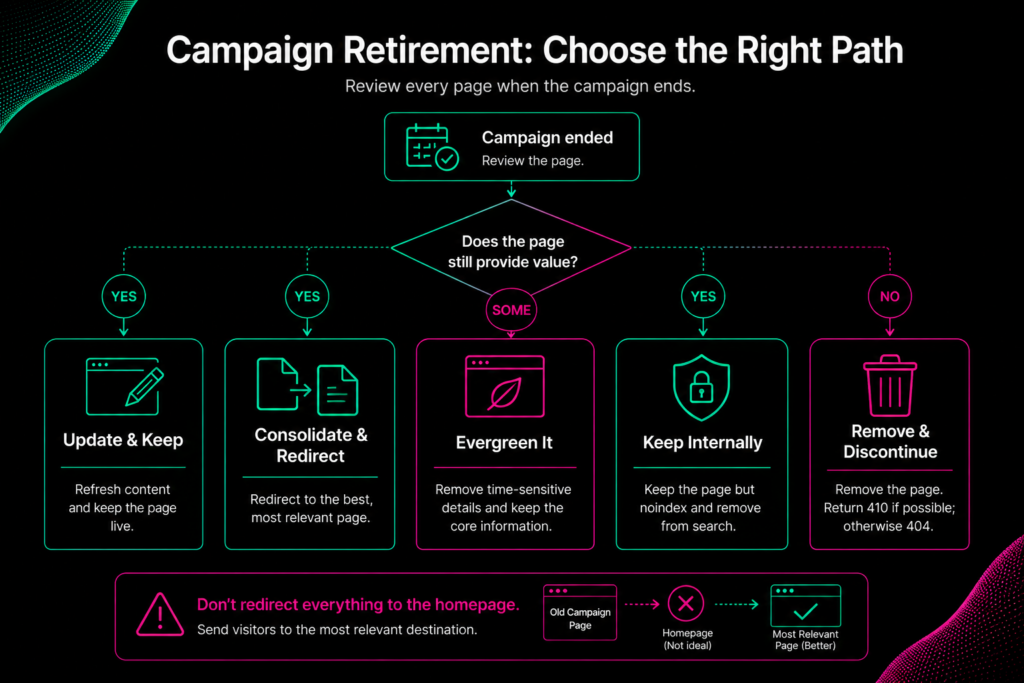
The correct course of action will depend on whether the page still has value.
| Post-campaign action | When it makes sense |
| Update the existing page | The audience and intent remain relevant, but the offer or messaging has changed. |
| Consolidate and redirect | A newer page now serves the same purpose and provides a relevant destination. |
| Remove campaign language | The page has earned links, organic traffic, or long-term informational value. |
| Keep the page but noindex it | Specific users still need access, but it should not appear in search results. |
| Return a 404 or 410 response | The content no longer exists and there is no useful replacement. |
Redirects must not automatically send all retired campaigns to the homepage. Instead they should be directed to an appropriate successor. If there is no equivalent page, then a suitable 404 or 410 response is better for both users and search engines.
Even if a noindex directive is used, it will not stop people who have the URL from accessing the page. While canonical tags can help to combine the signals for duplicate or greatly similar pages, they fail to deal with stale claims, fragmented reporting, or unclear ownership.
The choice regarding retirement should be included in the campaign brief and be allocated to an owner before publication.
Support the workflow with a stable WordPress environment
Content governance cannot make up for a production environment that does not work reliably.
When campaigns are launched there are at the same time modifications made to the copy, the templates, the forms, the tracking systems, the navigation, the caching arrangements, and the external integrations. Teams therefore need a safe environment in which to test these changes, a controlled method of getting them into production, and a realistic means by which to recover if anything goes wrong.
A production-ready campaign workflow should include:
- A staging environment that closely reflects production
- Reliable backups and a documented restoration process
- Controlled access to production settings
- Deployment and rollback procedures
- Performance monitoring
- Capacity planning for traffic spikes
- Clear ownership across marketing, development, and infrastructure teams
We offer managed hosting for WordPress on AWS, featuring customizable staging environments, backups, caching, security controls, assistance with deployments, and infrastructure tailored to demanding WordPress sites.
The campaign strategy is not determined by the infrastructure, but it does decide whether the team can launch, test, and revise that strategy without unnecessary risk.
A good WordPress landing page should be easy to retire
The quickest campaign workflow isn’t just the one that gets published first.
It enables the team to reuse approved structures, update key claims, verify changes made late, measure the right conversion, and allow a clear decision to be made when the campaign comes to an end.
WordPress includes a number of the tools required to support that process. Features such as patterns, locking controls, revisions, custom content structures, staging, and redirects are all capable of reducing the amount of maintenance work.
The other part of the task is just a matter of organization.
A campaign page should have a source of truth, an accountable owner, a clear conversion target, and a retirement plan. Once these decisions have been made, marketing teams will be able to act swiftly without leaving the rest of the website to take on the associated costs later.
WordPress landing page FAQ
Does each marketing campaign require a new WordPress landing page?
Not at all. A separate page is only justified when the campaign is aimed at a specific audience, promotes a particular offer, conveys a definite message, or leads to a specific conversion route. In the case where the purpose is essentially the same as that of an existing page, it would be better to update or adapt that page since this could result in a more satisfactory customer experience and reduce the amount of long-term maintenance required.
At what point should we use a synced WordPress pattern?
Use a synced pattern when the content should remain identical everywhere it appears and should be updated from one central location. Use an unsynced pattern when the structure should remain consistent but the copy, images, or offer will vary by campaign.
Should an expired campaign page redirect to the homepage?
Usually not. Redirect it to a relevant successor when one exists. If there is no useful replacement and the content has no continuing value, return an appropriate 404 or 410 response rather than sending visitors to an unrelated page.