
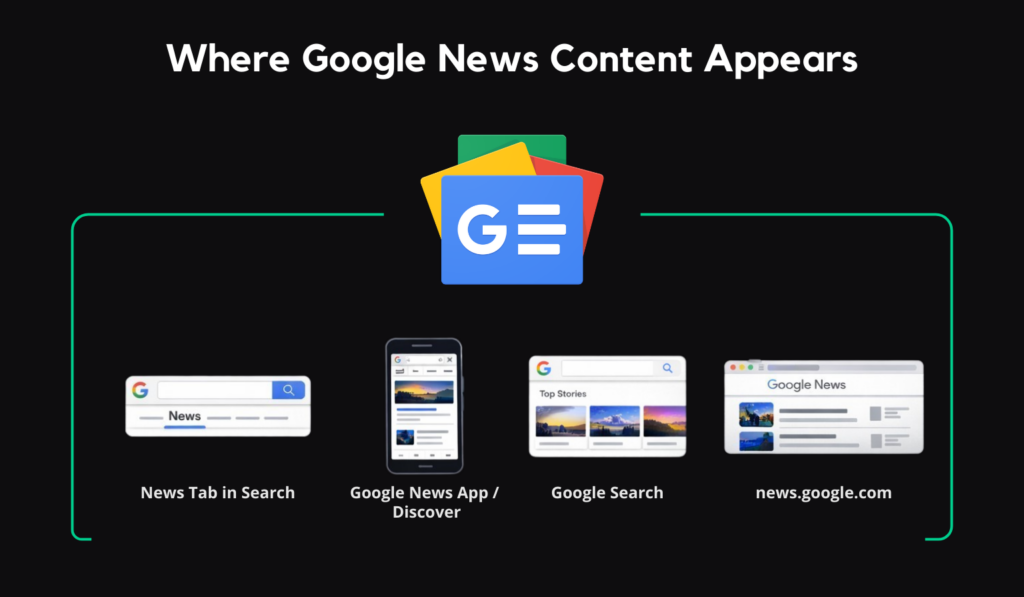
The way people discover news has changed. Readers are no longer starting at a publisher’s homepage and clicking around at leisure; they’re finding stories inside Google Search, the News tab, Google Discover, the Google News app, and the Top Stories carousel. That shift has made Google News optimization less of a niche tactic and more of a core publishing skill. If you want more visibility for your reporting, you need content that is timely, trustworthy, technically clear, and easy for Google to understand. This post will walk through how to do exactly that, so your stories have a better chance of being indexed quickly and appearing across Google’s news surfaces when attention is highest.
Understanding Google News and Its Impact on SEO
Google News now overlaps with mainstream search behavior, especially when users search for developing topics and see Top Stories or switch into the News tab. That matters for SEO because a single well-optimized article can earn visibility across several Google surfaces at once. For publishers, the upside is stronger brand recognition, more qualified traffic, and a better shot at reaching readers in the exact moment they’re looking for an update.
What is Google News?
At its core, Google News is an aggregator that organizes fresh reporting from publishers across the web and presents it in different contexts depending on what the user is searching for or following. Your content might appear on Google News, in the News tab inside Google Search, in Google Discover, or in the Top Stories carousel for news-oriented queries. Google also surfaces news content in different formats depending on relevance, freshness, authority, language, and user context. That means “Google News SEO” is really about preparing your content to travel well across an ecosystem.
Why Optimize for Google News?
Because the payoff can be dramatic. Google says Search and Google News send users to publisher websites more than 24 billion times each month. Even a smaller newsroom can feel the effect. A story that normally brings in a few hundred visits may suddenly attract a meaningful spike if it earns placement in Top Stories, Discover, or the News tab.
Beyond raw traffic, visibility in Google News can strengthen brand authority, help fresh content get discovered faster, and put your reporting in front of readers who are actively looking for timely information. In other words, it stands out as one of the clearest ways to turn good reporting into audience growth.
Essential Criteria for Google News Inclusion
The good news is that there is no longer a manual application process you need to pass before your content can be considered. Google’s current guidance is that eligible content from publishers who follow its policies is automatically considered for Google News and other news surfaces. The bad news is that “automatic” does not mean easy. Before you think about advanced tactics, your site needs to satisfy Google’s broader Search Essentials, its news content policies, and its transparency expectations. Old advice about “submitting your site to Google News” is outdated; today, the foundation is quality, crawlability, and trust.
Meeting Google’s Content Quality Standards (E-E-A-T)
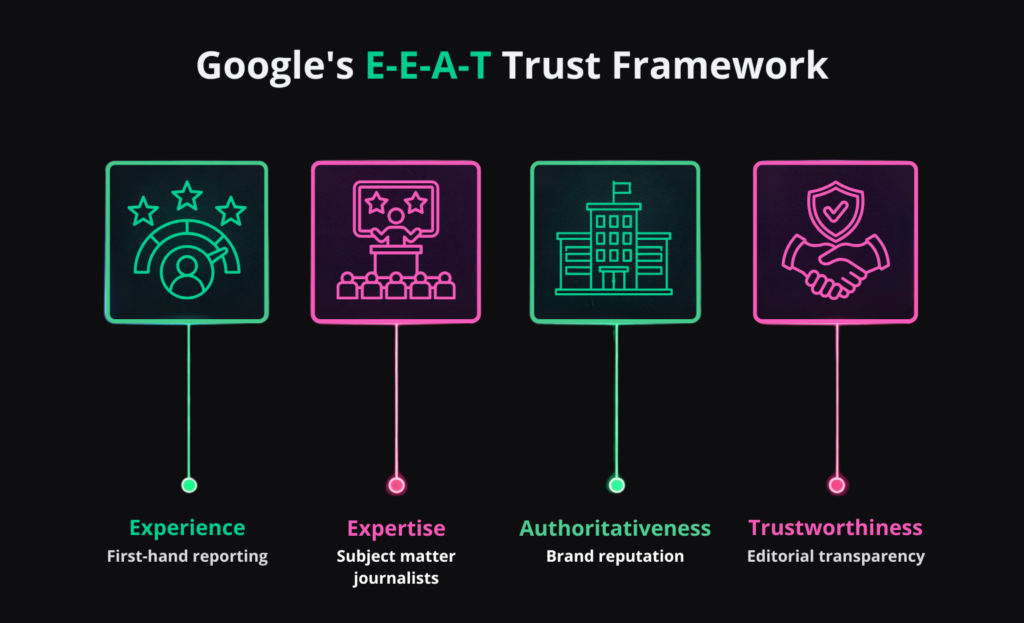
For publishers, E-E-A-T is not a buzzword. It’s a useful shorthand for the signals that make a story look credible: experience, expertise, authoritativeness, and, above all, trust. Google’s own search quality guidance explicitly points site owners toward E-E-A-T, and Google News policies place heavy emphasis on transparency. In practice, that means every article should clearly show who wrote it, when it was published, who the publisher is, and how a reader can learn more about the people and organization behind the content. Strong author bios, editorial pages, and visible contact details are all part of the trust layer.
Just as important, your content needs to stay inside Google’s policy lines. Repeated or egregious policy violations can make a site ineligible for news surfaces, and Google expects publishers to avoid harmful, dangerous, hateful, or deceptive material. It also wants original journalism, one clear visible publication date and time, and honest update practices. If a story materially changes, update it. If it does not, do not “freshen” it just to chase recency. A trustworthy article looks transparent in both editorial presentation and source code.
Setting Up Google Publisher Center
This is the part where many older Google News guides are now out of date. In 2025, Google completed its shift to automatically generated publication pages. Publishers can no longer set up new Google News publication pages in Publisher Center, and Google no longer uses RSS feeds or web locations submitted there to power those pages. So while Publisher Center still exists for some workflows and products, it is no longer the “get approved” lever many marketers assume it is.
Today, the smarter move is to treat your own site as the primary source of truth. Make sure your site name and favicon are configured properly, your structure is easy to crawl, your articles carry clean metadata, and your reporting is visible in Google Search Console. If you publish frequently, add a Google News sitemap alongside your regular XML sitemap, because Google says it can help its crawlers discover articles faster.
Technical Optimization for Google News
Great journalism will not help your visibility if Googlebot struggles to crawl the page, interpret its metadata, or understand what kind of content it is. News SEO is technical by nature because the publishing cycle is fast and the window of opportunity is short. Your goal is to make every article easy to discover, easy to parse, and easy to render correctly the first time.
Implementing News-Specific Structured Data
For article pages, structured data is one of the clearest ways to help Google understand what it is looking at. Use Article structured data or, even better for newsroom content, NewsArticle. Google’s documentation says there are no technically required properties for Article markup, but the recommended fields are the ones serious publishers should treat as non-negotiable:
headlinedatePublisheddateModifiedauthorauthor.nameauthor.urlimage
This is the data Google can use to better understand your content and display stronger titles, dates, and images across Search properties, including Google News.
Do not stop at the bare minimum. Give Google multiple high-resolution image variants in 16:9, 4:3, and 1:1 where possible, and make sure the lead image actually represents the story rather than a logo. Pair that with a news sitemap and regular validation in Google’s testing tools, and you make it much easier for your articles to be discovered quickly and shown attractively in results. For WordPress publishers, this usually means choosing a theme and SEO setup that outputs clean JSON-LD.
Mobile Optimization and Page Speed
News is increasingly consumed in motion, on small screens, and in short bursts of attention. Google’s mobile-first indexing guidance means the mobile version of your content is what’s primarily used for indexing and ranking. That means your mobile pages cannot be watered-down versions of the desktop experience. They need the same content, the same structured data, and the same metadata. On top of that, your mobile experience should perform well on Core Web Vitals, because those metrics reflect real-world loading, responsiveness, and visual stability.
AMP is the perfect example of how this landscape has evolved. In practical terms, AMP is optional now; Google’s current eligibility guidance for Top Stories focuses on high-quality, policy-compliant content, while AMP remains just one technical framework Google supports. The bigger issue is speed. Fast page rendering, stable layouts, optimized images, lean scripts, smart caching, and a responsive theme matter far more than checking an AMP box. For WordPress publishers, that also means your hosting stack can quietly become an SEO advantage or a bottleneck when a story breaks and traffic surges.
Creating Engaging and Relevant News Content
Technical SEO gets your story into the conversation. The content itself determines whether people click, stay, and trust you enough to come back. The most effective news articles answer the core question early, add context quickly, and make the next question easy to explore. That style works for readers, for search engines, and for AI-driven discovery systems that reward clarity, attribution, and strong entity signals.
Writing Compelling, Non-Clickbait Headlines
A strong Google News headline does two jobs at once:
- Earns the click
- Sets accurate expectations
Google’s Discover guidance explicitly warns against clickbait, misleading preview content, and sensationalism, while recommending titles and headlines that capture the essence of the page. That means the best headline is usually the clearest one. Front-load the key entity, tell the reader what happened, and leave cleverness for the subhead. “Fed Holds Rates Steady as Inflation Cools” will outperform vague curiosity-bait almost every time because it is precise, current, and trustworthy.
Consistency matters too. Google’s article page guidance recommends putting the headline prominently above the body, matching the HTML <title> tag to the article’s visible title, and aligning anchor text from section pages with the article headline. It also advises against stuffing dates into the title itself. For publishers, the simplest rule is to write one strong headline, use it consistently across your page elements, and only revise it when the story has materially changed.
Utilizing High-Quality Multimedia
Images do more than decorate an article. They help Google choose more compelling previews, influence click-through rate, and improve how your story appears in Discover and other news surfaces. Google’s Discover documentation recommends large images that are at least 1200 pixels wide, high resolution, and ideally suited to a 16:9 crop. Its Article markup guidance also recommends multiple high-resolution image ratios, including 16:9, 4:3, and 1:1. Use descriptive filenames, accurate alt text, and captions that add context rather than repeating the headline. And make sure your lead visual is actually about the story, not your publication’s logo.
Promoting Your Content Effectively
Google News rankings are algorithmic, and Google says factors such as relevance, freshness, authoritativeness, and prominence all play a role. That last one matters. A story that gets picked up, discussed, linked, and visited quickly can send stronger market signals than one that simply exists on your site. Promotion does not replace quality, but it can amplify it at the moment speed matters most.
Social Media and Syndication Strategies
When you publish a newsworthy piece, distribute it immediately and deliberately. Share it on X, LinkedIn, Facebook, newsletters, and any owned audience channels that fit your brand. The goal is not to “hack” Google News with social activity, but to create early audience momentum, earn secondary coverage, and give the story a chance to build prominence beyond your domain. Done well, syndication and earned backlinks from reputable outlets can reinforce the authority of the original reporting over time.
Monitoring and Analyzing Performance
News SEO moves too fast for vague reporting. If a story wins, you want to know why while the pattern is still fresh. If it flops, you want to know whether the issue was topic selection, timing, headline packaging, technical presentation, or distribution. A disciplined feedback loop turns each publication day into training data for the next one.
Using Google Analytics and Search Console
Start with Google Search Console. The Google News performance report shows data from news.google.com and the Google News app, while the standard Search results performance report can be filtered to Search type = News for the News tab in Google Search. That distinction matters because these are different surfaces with different user behaviors. Watch impressions, clicks, CTR, pages, queries, and country-level patterns so you can see which stories travel best and where your headlines are underperforming.
Then open Google Analytics 4:
- The Realtime report and Realtime pages report help you watch a story spike as it happens, see which pages users are on right now, and confirm whether a just-published post or social push is moving traffic.
- The Traffic acquisition report shows where those sessions are coming from across channels.
- Refer to the Engagement overview report to evaluate average engagement time, which is the modern GA4 proxy for how actively users are spending time with your content.
Together, those reports tell you whether the story merely attracted clicks or actually held attention.
Wrapping up
Optimizing for Google News is no longer about chasing a separate platform. It is about publishing fast, clear, trustworthy journalism on a site Google can crawl, interpret, and trust without friction. When your bylines are transparent, your markup is clean, your headlines are accurate, your images are strong, and your site performs under pressure, you give every story a better chance to earn visibility where modern readers actually discover news. And if your newsroom needs infrastructure that can handle traffic spikes without blinking, our enterprise WordPress hosting is worth a look.