
A WordPress reverse proxy lets you serve a WordPress site under a different domain, so visitors experience two separate sites as a single, unified one. Here’s how it works, why it matters for search visibility, and whether your site needs one.
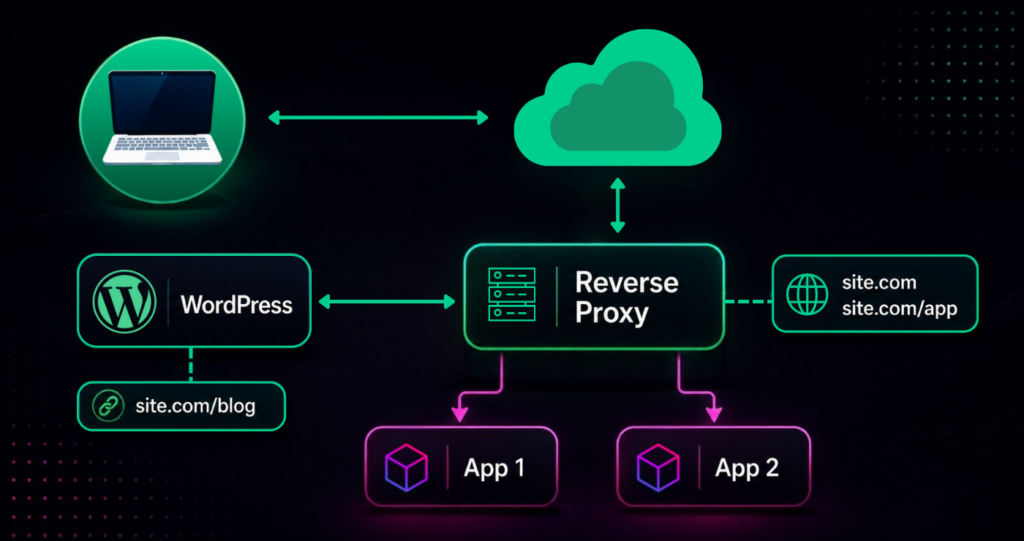
While explaining how it works is a little more difficult, the essence of what a WordPress Reverse Proxy does is simple. It allows your WordPress site to be viewed through another domain, so that your visitors have no idea they’re on a different site or system.
For example, let’s say you have a WordPress blog at MyAwesomeBlog.com and want to consolidate it with your main site, MegaSite.com. A WordPress Reverse Proxy will allow your blog to show up as something like MegaSite.com/Blog.
To put it in more technical terms, a reverse proxy serves as a middleman that forwards requests from clients to other servers. In this scenario, when someone visits MegaSite.com/Blog, the reverse proxy fetches the content from MyAwesomeBlog.com without changing the URL, creating a seamless experience for the user.
What makes a WordPress reverse proxy appealing?
This appeals mostly to enterprises, who have large and pre-existing sites already set up and don’t want to move everything to a separate WordPress site.
There are other uses, though, such as sites locked into an external domain for one reason or another. Commonly, these are small and mid-sized retailers using a secondary eCommerce platform.
Whatever the reason, if you have two separate sites, it pays to merge them together. Here’s why.
The advantages of a WordPress reverse proxy
The main advantage of reverse proxies is unification. You no longer have to redirect visitors off-site or bounce them around between two sites. This disorganization can get confusing and takes away from a brand’s credibility and professionalism. Combining the two sites gives a “no hair out of place” impression, even if it’s just an illusion created by the proxy.
The benefits of unifying your sites goes a lot deeper than superficiality. Merging your two sites has a great effect on SEO. This is less of an advantage and more about avoiding a disadvantage: if you have two separate sites, you’re dividing your SEO efforts by half. This is an inefficient use of your energy that can be rectified with a WordPress Reverse Proxy.
Moreover, a unified site structure simplifies content management and streamlines user experience. It allows webmasters to maintain a cohesive branding strategy across all content, enhancing user engagement and loyalty.
Combining your sites allows their SEO values to work together. If your main site draws a natural amount of traffic already, your secondary site can benefit from this popularity. And if you’re using WordPress to house your blog, this SEO boon is especially helpful. As a collection of keywords and attractive lures for new traffic, your blog is one of your most powerful SEO tools. If it’s on a different site, that’s a complete waste of potential. Consolidating everything under one domain also concentrates your authority signals, which helps your pages rank and get surfaced as answers for the queries that matter to your audience.
And because blogs are so powerful, they should be hosted on WordPress, which is generally recognized as the best platform for blogging, powering roughly 43% of all websites on the internet. Originating as a platform for bloggers, WordPress has since expanded its capabilities, but has retained the same user-friendly interface for authoring content without dumbing down its more advanced features.
It’s worth noting that the reverse proxy setup not only benefits SEO but can also improve website load times by leveraging caching capabilities. Faster load times contribute to a better user experience and further boost SEO, and remain a direct factor in Google’s Core Web Vitals page-experience signals.
Specifically, the beauty of WordPress for blogging is its inherent inclination for SEO. The coding itself, streamlined without excessive HTML, is attuned to Google’s categorization. On top of that, there are additional SEO plugins, namely Yoast SEO, to take this advantage even further.
With over 60,000 plugins in the official WordPress directory and tens of thousands more premium options, WordPress also showcases a broad range of customization and supported features, including monetization options. And with numerous forums for guidance, you can always find help just around the corner. Add to that the reliable security and recognized trust, and you see why it’s so popular.
So even if you’re tied into a separate domain, it still pays to launch an auxiliary WordPress site, even if only for blogging. And with a reverse proxy, you don’t have to sacrifice anything.
Key benefits of a WordPress reverse proxy
- Branding
- SEO
- Professionalism
- Single-site simplicity
- Allows blog content on WordPress
If this sounds like something that could benefit your site, let’s talk about how to set it up.
Setting up your WordPress reverse proxy
While many managed WordPress hosting services do not permit WordPress Reverse Proxies, we’re proud to say that Pagely is one of the few that do. As an available perk to our VPS plans and higher, our clients can enjoy the benefits of a reverse proxy for an additional subscription fee to cover ongoing debugging and extra support costs.
The setup process involves configuring your main site’s server to handle requests for the WordPress site. This typically requires modifying web server configuration files, such as Apache’s .htaccess or Nginx’s nginx.conf, to redirect certain URLs to the WordPress server. Proper configuration also includes setting canonical URLs and consolidating to a single XML sitemap, which prevents the duplicate-content issues a misconfigured proxy can otherwise create.
All our clients have to do is submit a support ticket, and our team then handles the set up manually. For specific details, read this entry in our support section or receive a quote now.
Final thoughts on WordPress reverse proxies
WordPress is designed to support any genre of website from blogs to eCommerce stores (with the help of the WooCommerce plugin). Most of the time, you can build your entire site on WordPress, with its capacity to suit whatever your end goals may be.
That said, there are some circumstances outside your control that require you to use a separate domain. As mentioned above, the most common are working with a large enterprise site or pre-established eCommerce stores in an umbrella platform.
Even in these situations, you still don’t need to give up the SEO advantages and convenience or WordPress. A reverse proxy gives you the benefits of WordPress without disrupting the setup of your existing site.
WordPress reverse proxy FAQs
What is a WordPress reverse proxy?
A WordPress reverse proxy is a server that receives visitor requests and forwards them to your WordPress site, then delivers the content back under your primary domain. Visitors see one unified website even though the content actually lives on a separate WordPress installation.
What’s the difference between a reverse proxy and a redirect?
A redirect sends visitors to a different URL and changes the address shown in the browser. A reverse proxy fetches the content behind the scenes without changing the URL, so the experience stays seamless and the visitor never leaves your main domain.
Is a WordPress reverse proxy bad for SEO?
No. When configured correctly, a reverse proxy benefits SEO by consolidating two domains’ authority into one. Problems only arise from misconfiguration (missing canonical tags, duplicate content, etc.), which is avoided by setting proper canonical URLs and using a single XML sitemap.
Does a reverse proxy slow down a website?
Not necessarily. A reverse proxy adds a small processing step, but caching at the proxy layer often makes pages load faster overall rather than slower.
Do I need technical skills to set up a WordPress reverse proxy?
Setup involves editing web server configuration files such as Apache’s .htaccess or Nginx’s nginx.conf. With a managed host like Pagely, however, the provider’s support team handles the configuration for you after you submit a request.
As search increasingly rewards consolidated, well-structured sites, unifying your domains is more valuable than ever. A WordPress reverse proxy makes that possible without rebuilding what already works, and our team is here to help you set it up.